

At a glance
The problem: I needed to keep creative requests, saved workflows, executions, and generated outputs connected and traceable.
What I built: A ComfyUI-based workflow system that validates supported requests, coordinates configured image and video workflows, and records each execution.
My role: I conceived the system, defined its requirements, configured the production workflows, directed AI-assisted development, and handled testing and ongoing operation.
The result: A repeatable way to submit work and trace its results, with creative review and final approval kept human.
Keeping requests and results connected
Creative production means juggling requests, saved workflows, and generated files. I needed a clear way to organize submissions, protect my saved workflows, and identify the output associated with a job.
My Role: From Concept to Operation
I conceived the Controller, designed and configured its ComfyUI workflows, directed AI-assisted development, and handled testing and day-to-day operation. I am the only person working directly with these ComfyUI pipelines.
What I Built and Owned
I conceived the Controller, defined its requirements, and directed its AI-assisted development through Codex. I personally design and configure the ComfyUI workflows and operate the system in my own creative production.
- System design. I defined how supported requests enter the system, how saved workflows are protected, and how each submission stays connected to its execution and output.
- Workflow integration. I configure the models, nodes, input connections, and controls that turn a creative request into an executable image or video workflow.
- Testing and operation. I direct testing, review generated results, and use execution records to investigate problems and refine the system’s behavior.
- Creative ownership. I choose the source material, assess the results, and approve workflow changes. Submission, technical completion, and creative acceptance remain separate decisions.
Codex assists with software implementation. ComfyUI, third-party models, and custom nodes provide the underlying generation capabilities. My responsibility is bringing those tools together into a working production process and deciding how it should behave.
One place to submit and track requests
The Controller gives supported image and video requests one local interface. It validates the inputs, selects a registered workflow, submits the work, and records a receipt identifying that execution.
A receipt is an acknowledgement of submission. It does not claim the creative work is complete or good. Where a delivery process is configured, it follows the identified request rather than selecting whatever file happens to be newest.
How the workflow fits together
- Define the request. Choose a supported task and provide its prompt, reference media, and relevant controls.
- Use the intended workflow. Read and validate the registered master, then apply the request’s inputs without overwriting that saved master.
- Keep the execution traceable. Record the request, workflow snapshot, and execution identifiers in a receipt.
- Follow the right output. An applicable delivery route checks the output associated with that particular execution.
- Make the creative decision. A person reviews the result and decides whether it serves the intended purpose.
A real workflow in use
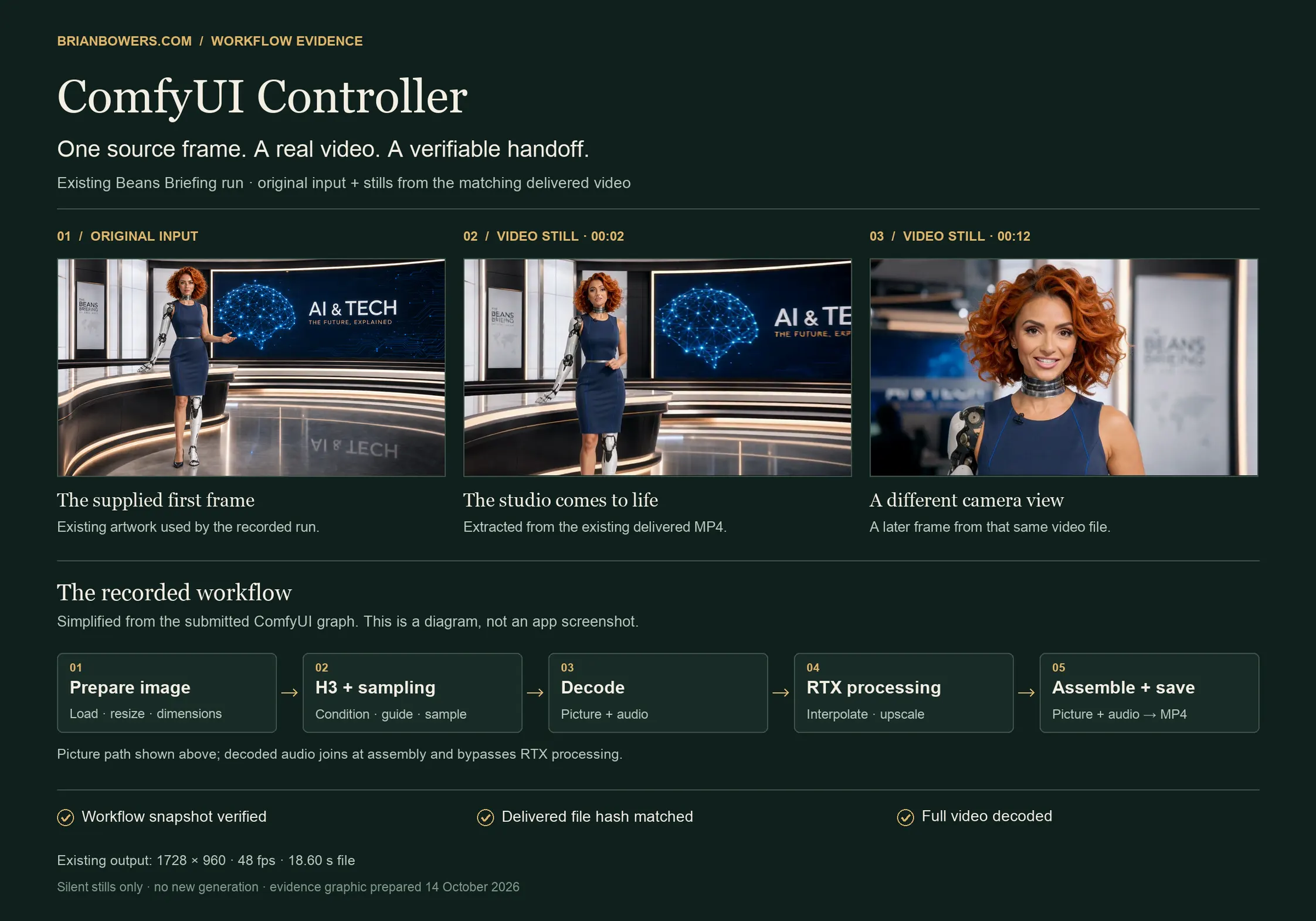
What changed
Supported tasks share one interface and a record of the request and saved workflow used. Delivery checks, where configured, follow the output tied to that job. Creative approval remains a human decision.
These are documented system behaviors. This case study does not claim a measured time saving, a client deployment, or a commercial outcome.
What stays human
The system can handle routing, validation, and record keeping. It cannot decide whether an image feels right, whether a performance works, or whether a new creative workflow should become the accepted standard. Those decisions stay with the person directing the work.
The capability beyond this project
For a production task you repeat, I can map the steps, identify what to automate, and define where a person should review the result. Let’s look at one workflow you want to improve.
Evidence and privacy
Internal addresses, private configuration, prompts, and personal media are excluded from this page.
